August 25, 2026 • Doug Porter • 11 min reading time • Prices verified June 25, 2026
Binder, Sleeve, or Box? Building a 35mm and 120 Negative Archive That Actually Scales
That box of negatives in your closet — the one rubber-banded together and shoved into a shoebox — contains compressed decades of real life. Every strip is a latent family history, a body of photographic work, or an irreplaceable record that exists in exactly one physical place in the world. The good news: organizing it properly is genuinely achievable, and the system you build today will still be working in thirty years. This guide is about building that system — understanding how negative sleeves (the individual plastic pages that hold film strips), binders (the ring-bound books those pages slot into), and archival boxes (the outer protective shells) work together as interlocking layers, not interchangeable choices. Whether you’re starting with two dozen rolls or scaling toward thousands, the architecture decisions you make early will determine whether your archive stays searchable and safe, or quietly collapses into chaos.
| EDITOR'S PICKeTone Archival Storage Sheets 1… | Mid-tierAcid Free Archival Film Bag Alb… | Budget pickPrint File Archival 35mm Size N… | |
|---|---|---|---|
| Format | 135 (35mm) | 135/120/4x5/8x10 | 35mm |
| Binding | Ring binder | 3-ring binder | — |
| Leaves | 50 | — | 25 |
| Frames per strip | — | — | 4 |
| Strips per page | — | — | 7 |
| Storage type | Pages + binder | Bags + box + binder | Pages only |
| Price | $29.99 | $20.99 | $11.70 |
| See on Amazon → | See on Amazon → | See on Amazon → |
Why “Archival” Isn’t Just a Marketing Word — and Why It Matters for Film
Let’s clear up a term that gets thrown around loosely. When manufacturers call a product archival, they’re making a specific technical claim: that the material won’t off-gas chemicals that degrade the film it’s touching over time. Acid-free means the material has a neutral or alkaline pH — it won’t become acidic and attack your negatives chemically. These two properties overlap but aren’t identical, and the distinction matters more than most buyers realize.
The Library of Congress Preservation Directorate’s care guidelines for photographic materials are unambiguous on this point: film should be stored in enclosures that pass the Photographic Activity Test (PAT) — an ISO-standard test (ISO 18916) that specifically evaluates whether a material will chemically react with photographic emulsions over time. A sleeve can be acid-free but still fail PAT if it contains plasticizers or sulfur compounds that migrate into the emulsion. The Image Permanence Institute at Rochester Institute of Technology notes that polypropylene and polyethylene are generally safe choices for film enclosures, while PVC (polyvinyl chloride) — common in cheap binders and sheet protectors — is definitively harmful to film over multi-year storage.
This is the foundation the rest of your system sits on. Get the chemistry wrong and no organizational elegance saves you.
The Three-Layer System: How Sleeves, Binders, and Boxes Work Together
Think of your archive as three nested layers of protection and organization, each doing a different job.
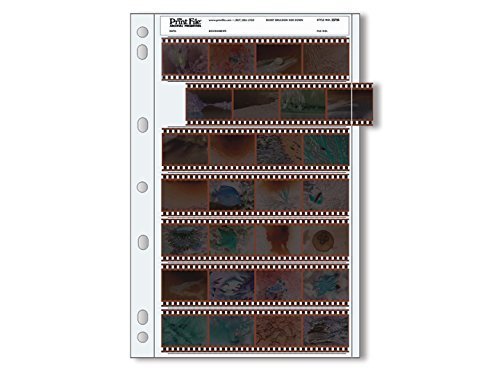
Layer 1 — The sleeve (negative page): This is the material that touches your film. Its job is chemical protection and physical organization. A 35mm sleeve typically holds four to six strips of five or six frames each; a 120 medium format sleeve holds three or four strips depending on frame count (6×4.5, 6×6, 6×7, 6×9 all have different strip lengths). The sleeve determines how easily you can view, scan, and retrieve individual negatives without handling them directly.
Layer 2 — The binder: The binder holds your sleeves in order, keeps them flat, and gives you a browsable, shelf-stable unit. The critical fit variable is the ring size and spine width — a sleeve that’s designed for a specific binder page standard will lay flat and load smoothly; a mismatch means buckled pages and sleeves that pop out at the bottom row. More on why that matters shortly.
Layer 3 — The archival box: Boxes protect against light, dust, humidity fluctuation, and physical compression. For long-term cold storage or collections that won’t be accessed frequently, the box is the primary environmental barrier. For active working archives, boxes keep binders grouped by project, year, or client.
The three layers are additive, not redundant. Skipping the box doesn’t make the binder work harder — it exposes your binders to the exact conditions (light, humidity, dust) that accelerate film degradation.
Sleeve Manufacturing Precision: The Detail Most Buyers Miss
Here’s where the system-building conversation gets specific, and where price differences between sleeve brands are actually justified.
Reviewers who have used multiple negative sleeve brands over extended periods consistently return to one observation: the quality of the cut at the bottom of each sleeve row matters enormously. A sleeve with imprecise bottom cuts leaves the last strip in each row partially exposed, difficult to insert without bending, and vulnerable to edge damage. One well-documented reviewer account — cited across multiple long-form discussions at B&H Photo Video — describes switching brands specifically because the bottom rows on a competing product were, in their words, “unusable due to poor cutting.” That’s not a minor usability complaint; it’s a fundamental failure of the sleeve’s core function.
Print File is consistently identified as the industry benchmark for this reason. Reviewers who have used every format Print File manufactures — 35mm, 120, 4×5, and beyond — over many years point to manufacturing consistency as the differentiating factor over generic alternatives, not just material specification. The sleeves open cleanly, the strips seat fully into every row including the bottom, and the pages punch-hole register is precise enough that binder pages don’t skew under load.
The practical implication: a sleeve that fails on bottom-row precision effectively reduces your storage capacity by 15–20% per page while also creating handling friction every time you access those frames. Across thousands of pages in a mature archive, that’s a meaningful compounding cost.
Format-Specific Considerations: 35mm vs. 120
35mm Negative Storage
Standard 35mm negative pages hold either 35mm-6B format (six strips of six frames, the most common) or 35mm-7B format (seven strips of five frames, preferred by some for bulk storage). These pages are designed to fit standard three-ring binders with a 2-inch ring for moderate capacity or 3-inch rings for high-volume applications.
A frequently cited capacity estimate from experienced Print File users: a standard two-inch ring binder with 35mm-6B pages holds approximately 125–150 rolls of 36-exposure film. The actual number depends on whether rolls are consistent 36-exposure or include shorter rolls, and whether you’re filing contact sheets alongside the negatives.
120 Medium Format Storage
120 film — the larger-format film used in medium format cameras, which produces negatives roughly 6×4.5cm to 6×9cm depending on camera — requires dedicated pages. The Print File 120-4UB page (holding four strips of medium format negatives) is designed to pair with OB oversize binders, which use a wider spine to accommodate the larger page dimensions. One Print File 120 reviewer with documented long-term use estimates this combination yields 100-plus rolls per binder — a concrete capacity benchmark worth planning against if you’re building a 120-specific archive.
The key mistake to avoid with 120: using standard letter-size binders with 120 pages. The pages will fit the rings but the film strips extend beyond the binder cover, creating edge stress and potential crease damage at the binder spine.
By the Numbers
| Format | Page Type | Strips per Page | Rolls per 2” Binder (est.) |
|---|---|---|---|
| 35mm (36-exp.) | Print File 35mm-6B | 6 strips × 6 frames | ~125–150 rolls |
| 120 (6×6) | Print File 120-4UB | 4 strips | ~100+ rolls |
| 120 (6×7) | Print File 120-3UB | 3 strips | ~75–90 rolls |
Capacity estimates based on aggregated reviewer reports and manufacturer specifications; actual capacity varies with roll length and filing density.
Building a Catalog System That Doesn’t Collapse at Scale
The single most common archive failure isn’t material degradation — it’s findability collapse. A collection that can’t be searched is effectively inaccessible, and inaccessible negatives don’t get scanned, printed, or preserved.
One workflow documented by a Feifeiya archival kit owner offers a model worth examining: the kit’s included labeling index cards (inserted into the sleeve’s top label window) were used as a physical template to build a parallel Google Sheets catalog. Each row in the spreadsheet maps to one sleeve: binder number, sleeve number, roll date, subject, film stock, and a “priority scan” flag. The index card in the physical sleeve carries the same binder/sleeve number as the spreadsheet row. Cross-referencing is instant — you search the spreadsheet, get a binder and sleeve number, pull the physical page.
This two-ledger approach (physical label + digital catalog) is the architecture professional archivists recommend for exactly the reason the Society of American Archivists emphasizes in their photographic materials guidelines: physical labels degrade and can be illegible in ten years, while purely digital catalogs become inaccessible when software changes. The redundancy is the point.
Minimum labeling schema for a scalable archive:
- Binder identifier (B001, B002…)
- Sleeve/page number within binder (01–whatever)
- Roll date or date range (YYYY-MM or YYYY)
- Subject or project name
- Film stock (critical for scan correction — Kodachrome needs different handling than Tri-X)
- Scan status flag
Can You Mix 35mm and 120 Pages in the Same Binder?
Technically yes, mechanically problematic. Standard 35mm pages and 120-format pages use different ring-hole spacings because they’re designed for different binder spine widths. Forcing 120 OB-format pages into a standard letter-size binder creates the same edge-stress problem described above — plus your binder won’t close flat once it’s loaded with mixed-width pages.
The cleaner architecture: dedicate binders by format. If your collection is primarily 35mm with occasional 120 rolls, keep a separate, clearly labeled OB binder for medium format material rather than mixing into your 35mm binders. The organizational overhead is minimal; the physical protection difference is real.
Frequently Asked Questions
What is the difference between “acid-free” and “archival” negative sleeves? Acid-free means the material has a neutral or alkaline pH — it won’t chemically attack film the way acidic paper does. Archival is a broader claim that typically includes passing the ISO 18916 Photographic Activity Test, which evaluates whether a material will react harmfully with photographic emulsions over time. A sleeve can be acid-free but still fail PAT due to plasticizers or other compounds. For long-term film storage, look for PAT-tested materials specifically, not just “acid-free” labeling.
How many rolls of 35mm film fit in a standard archival binder? Based on aggregated reviewer capacity estimates, a two-inch ring binder loaded with Print File 35mm-6B pages holds approximately 125–150 rolls of 36-exposure film. Three-inch ring binders proportionally more. Your mileage varies with roll length and whether you file contact sheets alongside negatives.
Can I mix 35mm and 120 negative pages in the same binder? Not advisably. The two formats use pages designed for different binder spine widths. Forcing them together creates edge stress on the larger 120 pages and prevents binders from closing flat. Dedicate separate binders to each format.
How do I label and index negative sleeves so I can find specific frames later? Use a two-ledger system: a physical label in each sleeve’s label window (binder number + sleeve number + date + subject) and a parallel digital catalog (a spreadsheet works well) that mirrors the same fields. The redundancy protects you if either system degrades or becomes inaccessible. Minimum useful fields: binder ID, sleeve number, roll date, subject, film stock, and scan status.
Are Print File sleeves actually worth more than cheaper alternatives? Based on the documented pattern across long-term user reviews: yes, specifically because of manufacturing precision at the bottom rows of each sleeve. Reviewers who switched from competing brands consistently cite imprecise cutting at the bottom row as the failure point — a defect that reduces usable capacity and creates handling friction at scale. For occasional storage, the difference is minor. For archives you’ll actively use and expand over years, the precision premium compounds in your favor.
What is the best way to store 120 medium format negatives long-term? Use Print File 120-format pages (120-3UB or 120-4UB depending on frame count) in OB oversize binders sized for the wider page dimensions. Store loaded binders in acid-free archival boxes in a cool, stable-humidity environment — the Library of Congress Preservation Directorate recommends below 65°F and 30–40% relative humidity for film materials. Avoid attics and basements where temperature and humidity fluctuate seasonally.
The Decision Rule
If your collection is under 50 rolls and growing slowly: start with a single Print File binder in the correct format — 35mm or 120 — and build the labeling habit from day one. The binder is the right unit at this scale; a box becomes worthwhile when you have three or more binders to protect.
If you’re at 50–500 rolls or managing a client archive: the three-layer system (sleeves + dedicated binders by format + archival boxes) is the minimum viable architecture. Add the digital catalog now, before findability becomes a crisis. At this scale, sleeve precision starts paying dividends every time you pull and refile material.
If you’re scaling past 500 rolls or running a studio or institutional archive: binder capacity planning (using the estimates in the table above) becomes a genuine logistics question. Map your collection against binder capacity, plan your box storage footprint, and build the digital catalog with enough fields to support batch scanning prioritization — film stock in particular, because Kodachrome and Ektachrome handle differently at the scanner and in post-processing, and you want to be able to pull all your Kodachrome together rather than hunting through mixed binders.
The system you build is only as good as the weakest layer. Get the chemistry right, get the precision right, and label everything from the first sleeve. The negatives will outlast the chaos if you give them the architecture to do it.