August 4, 2026 • Doug Porter • 12 min reading time • Prices verified June 25, 2026
The Inherited Slide and Negative Mountain: Choosing the Right Dedicated Film Digitizer for Bulk Projects
That box of slides in your parents’ attic isn’t just plastic and dye. It’s every birthday party, every vacation, every face that doesn’t exist anywhere else on earth. If you’re staring down a mountain of 2,000 Kodachrome slides or a shoebox stuffed with 35mm negative strips — and you need to digitize them before they fade further or get lost in an estate handoff — you need a tool that matches the scale of the job. A dedicated film digitizer is a standalone device (no computer required, no flatbed scanner bed to fiddle with) that lets you feed film through a slot, capture a digital image, and save it to an SD card or USB drive in seconds. They’re not the sharpest tools in the drawer, and the imaging community is clear-eyed about that — but for a bulk preservation project measured in thousands of frames, their speed advantage over flatbed scanning can be decisive. This article is a comparison-focused decision guide for the practitioner who is already past “should I digitize?” and is now asking “which device gets this done without destroying my winter?”
The Honest Speed-vs-Quality Tradeoff You Need to Internalize First
Before picking a device, you have to make a values decision — and you should make it explicitly rather than discovering it six weeks into scanning.
Dedicated film digitizers — the Kodak Slide N SCAN Max, the Magnasonic MFSC1200, and their category peers — typically capture images at effective resolutions between 14 and 22 megapixels, using a fixed-focus CMOS sensor behind a lens. The stated megapixel count is usually a software interpolation of a lower optical capture. The filmscanner.info Film Scanner Comparison Database (2025 edition) notes that most consumer-grade digitizers in this class deliver real optical detail closer to 5–8 megapixels equivalent — honest enough for 4×6 prints and screen viewing, but showing its limits at 8×10 and above.
Flatbed scanners — like the Epson Perfection V600 or V850 Pro — capture at true optical resolutions that, for 35mm film, range from 2,400 to 4,000 PPI (pixels per inch, the real measure of how much detail the scanner physically resolves). At 4,000 PPI on a V850, a 35mm frame yields roughly 48 megapixels of genuine optical data. That’s a different category of output, and imaging-resource.com’s Dedicated Film Scanner Roundup (archived 2024) makes the same distinction clearly when separating “preservation scanning” from “archival master scanning.”
The tradeoff in plain terms:
| Metric | Dedicated Digitizer | Flatbed Scanner |
|---|---|---|
| Time per frame (slides) | ~8–12 seconds | ~3–5 minutes |
| 2,000-slide project | ~8–12 hours active time | ~100–170 hours |
| Effective optical resolution | ~5–8 MP equivalent | ~20–48 MP (film-limited) |
| Cost of hardware | $100–$250 | $280–$900+ |
If your goal is a family archive that can be shared digitally, printed at snapshot size, and preserved on a hard drive, a dedicated digitizer is genuinely sufficient and the speed math is decisive. If you need enlargement-grade quality or are producing archival masters, a flatbed is the right answer and the time investment is part of the price.
Most practitioners with inherited collections in the 1,000–10,000 frame range land in the digitizer camp. That’s who this article serves.
The Three Tiers: Which Device Matches Your Collection
Budget Entry Point: Basic 14MP Slide and Negative Converters
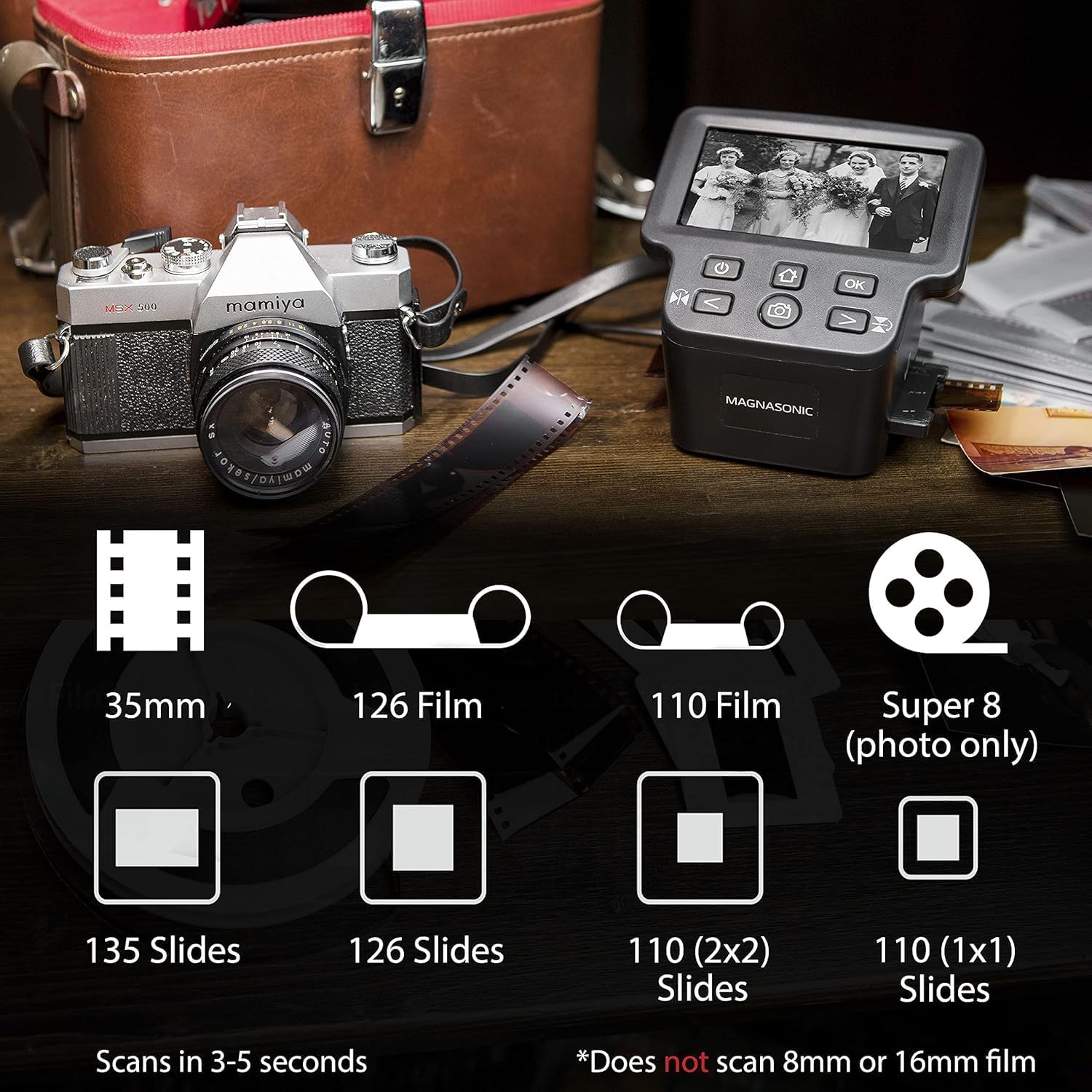
Magnasonic FS71
$110.96
In stock on Amazon
Check price on AmazonThe lowest tier of dedicated digitizers — devices typically priced under $80 and rated at 14 megapixels — are worth understanding primarily so you know what to avoid for a bulk project. Owners who process more than a few hundred frames consistently report that this tier’s weaknesses compound at volume: slower write speeds, flimsier film carriers that misalign after extended use, and color inversion algorithms for negatives that produce greenish or magenta-shifted results that require significant post-processing correction.
The filmscanner.info Film Scanner Comparison Database specifically flags that stated megapixel counts in the budget tier are interpolated from sensors as low as 3–5 MP optical, meaning the gap between marketing and actual output is widest here. For a 50-slide test project, the results may seem acceptable. For a 2,000-slide inherited collection, the accumulated color correction work will cost more time than the money saved on hardware.
Who it’s actually for: Someone who needs to digitize a single roll of negatives or 50 slides to share at a family reunion, and has no intention of scaling up. Not the right tool for the bulk practitioner this article addresses.
Magnasonic FS71
$110.96
In stock on Amazon
Check price on AmazonMid-Tier Workhorse: Magnasonic MFSC1200
Kodak
$135.99
In stock on Amazon
Check price on AmazonThe Magnasonic MFSC1200 is the device that repeatedly appears in “I bought it after returning the other one” owner narratives. The imaging-resource.com Dedicated Film Scanner Roundup and aggregated owner reviews at B&H Photo Video’s product pages both surface a consistent pattern: owners who tried a cheaper or lesser-known digitizer first, got soft or color-shifted results, returned it, and landed on the Magnasonic as the step-up that actually delivered usable images.
The MFSC1200’s particular strength is negative strip handling. Owners who report processing large volumes of negatives in sustained sprint sessions — the kind of volume that comes from consolidating an entire family’s photo archive — consistently cite the negative carrier design as faster and less frustrating than competing devices at this price point. The 22-megapixel figure Magnasonic states is interpolated, per filmscanner.info’s methodology notes, but the base optical capture is solid enough that owners printing at 5×7 report acceptable sharpness.
Where owners push back: The color inversion for negatives (the software that turns an orange-masked color negative into a positive image) handles modern and lightly aged film well but struggles with heavily faded negatives. If your negatives have significant magenta or cyan drift from decades of storage, the in-device processing may not recover them cleanly. The practitioner’s answer: save the raw captures and do color correction afterward in dedicated software.
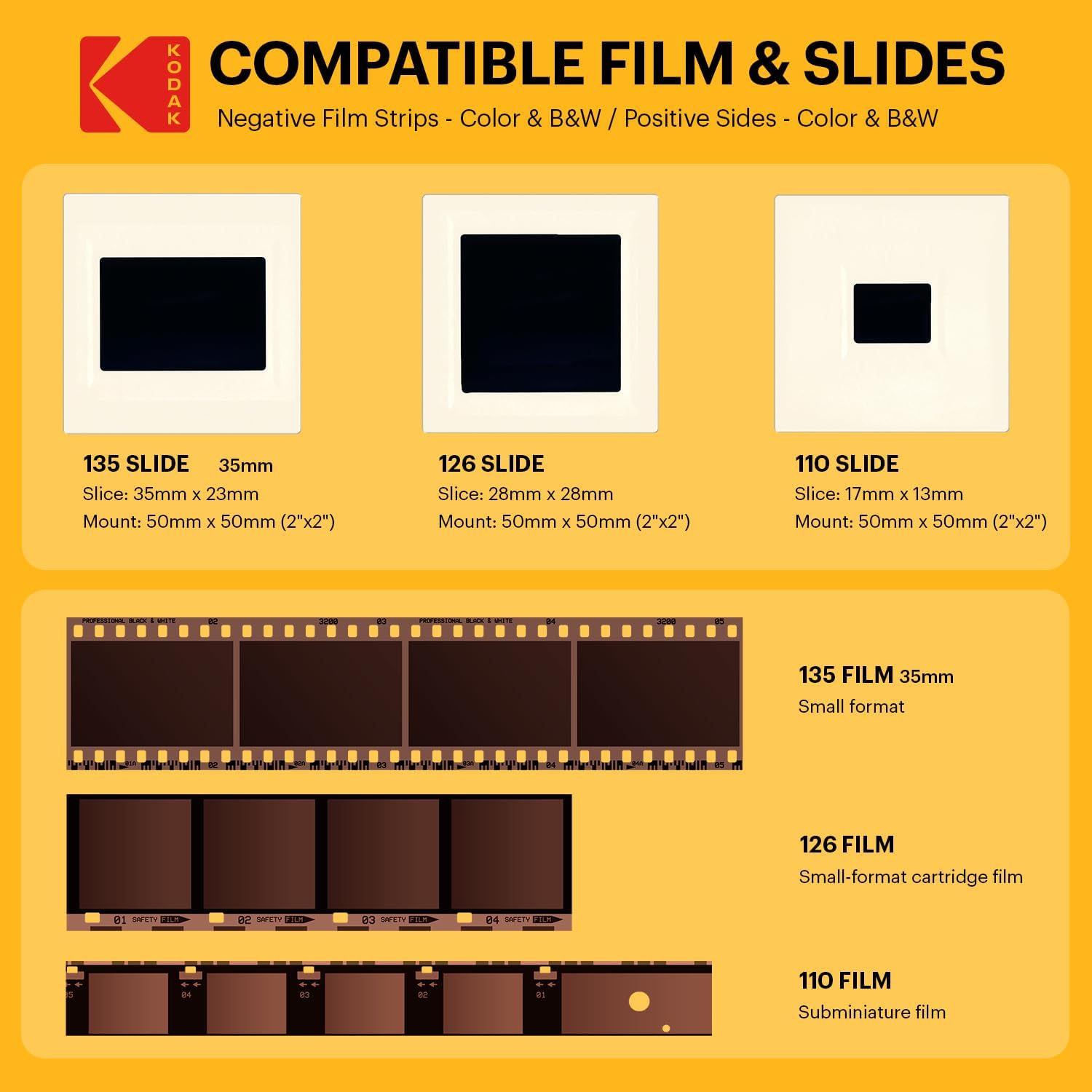
Formats supported: 35mm mounted slides and 35mm negative strips. Medium-format (120/220) and APS are not supported — for those formats, a flatbed scanner with the appropriate film holder is the correct tool.
Who it’s for: Collections weighted toward 35mm negative strips, or mixed collections where you need a device that handles both slides and negatives without constant adapter swapping. Also the right answer if you’ve already been burned by a budget device.
Kodak
$135.99
In stock on Amazon
Check price on AmazonTop-of-Category: Kodak Slide N SCAN Max
KODAK
$178.49
In stock on Amazon
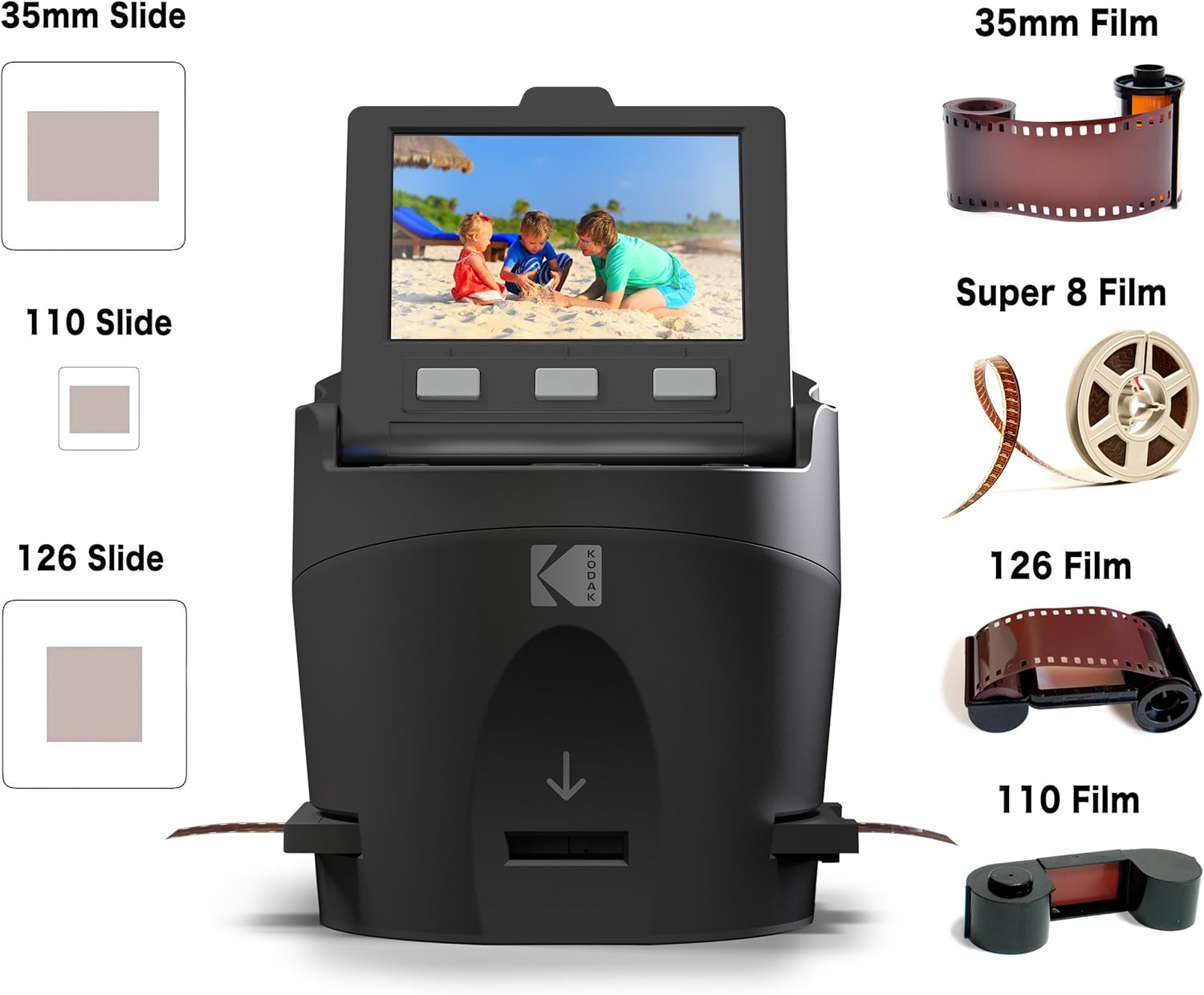
Check price on AmazonThe Kodak Slide N SCAN Max (the current top-of-line variant in the Kodak-branded digitizer lineup, sold under license) is the device camera retail professionals most frequently validate for slide work specifically. Aggregated owner reviews at B&H Photo Video’s product pages reflect consistent praise: color rendering on mounted slides is better than competing devices at this price point, and the tray-feed mechanism for slides is robust enough for long sessions.
Owners processing 2,000 or more slides specifically call out the slide tray system as the key workflow enabler — you load a batch, advance through them at your own pace, and the process becomes almost meditative rather than fiddly. The built-in 5-inch LCD screen lets you preview each frame before committing the capture, which matters when you’re triaging a collection and want to skip the obviously ruined frames without wasting captures.
Where owners push back: The HDMI-out feature (which allows you to view slides on a TV — more in the FAQ section) is occasionally reported as laggy during active scanning. File transfer via SD card has generated complaints about slow write speeds when using off-brand cards. The fix consistently cited by experienced owners: use a high-speed Class 10 / U3 SD card. Screen freeze incidents during transfer are the most-reported firmware quirk; the workaround is to let the device fully finish writing before ejecting the card, and to keep session lengths under 200 frames before offloading to a computer.
Formats supported: 35mm mounted slides and 35mm negative strips. Does not support medium-format or APS film.
Who it’s for: Anyone with a primarily slide-heavy collection — mounted Kodachrome, Ektachrome, or slide-format transparencies — who wants the best color starting point in the consumer digitizer category without moving to a flatbed workflow.
KODAK
$178.49
In stock on Amazon
Check price on AmazonThe Memory and Transfer Problem Nobody Warns You About
This is the friction point that consistently derails bulk digitization projects, and it deserves treatment as a first-class decision factor rather than an afterthought.
Both the Kodak and Magnasonic devices write images to SD cards (and in some configurations, USB drives). A 22-megapixel JPEG from these devices runs approximately 6–8 MB per file. Two thousand slides equals roughly 12–16 GB of storage — manageable on a 64GB or 128GB card, but the workflow question is: how do you get files off the card and backed up without creating a bottleneck or a single point of failure?
Owners who have processed large collections successfully report two practices that matter most:
- Use a fast SD card — U3 / V30 rated at minimum, 64GB or 128GB. The device will write faster, and you’ll have headroom for a full session before offloading.
- Build in offload sessions — Every 200–300 frames, stop, copy the card to a computer or network-attached storage drive, verify the copy, then clear the card. Running the card to capacity and then discovering a transfer error is the nightmare scenario with irreplaceable material.
The Library of Congress digital preservation guidance document “Digitizing Personal Collections” (available via loc.gov) recommends the 3-2-1 rule as the minimum backup strategy for personal digitization projects: 3 copies of every file, on 2 different media types, with 1 copy stored off-site or in cloud storage. For inherited family photographs — material that cannot be re-shot if lost — this standard is worth taking seriously.
Film Stock Matters: Why Your Slides May Look Faded No Matter What You Scan Them With
One of the most common points of confusion in owner communities is whether a washed-out or color-shifted result is the scanner’s fault or the film’s fault. The answer is usually: both, and they’re separate problems.
Kodachrome slides from the 1960s–1980s are famous for exceptional dye stability, but they often show cyan channel fading in the shadows over time. Ektachrome and Fujichrome slides from the same era trend toward magenta shifts as the cyan dye layer degrades. These are film-stock-specific fade profiles, not scanner artifacts.
What the scanner adds: consumer digitizers typically apply fixed white balance algorithms that assume a neutral light source. If your slides have a strong color cast, the device’s auto-correction may overcorrect or apply a blanket correction that helps some frames and hurts others.
The practitioner’s workflow answer: scan everything first, correct afterward. Get the raw captures onto your hard drive, then batch-process color correction in software. This separates the capture problem (which the digitizer solves adequately) from the color recovery problem (which dedicated software handles far better than any in-device processing).
Frequently Asked Questions
How many slides per hour can I realistically scan? Based on owner reports across large collections documented in B&H Photo Video’s product review aggregations, expect 150–300 slides per hour once you’re in rhythm. That accounts for loading, advancing, occasional previewing, and brief pauses. The Kodak’s tray system is faster than single-frame loading; the Magnasonic’s negative strip carrier has a similar batching advantage for negatives. A 2,000-slide project is realistically a two-to-three weekend project.
Do I need to buy an SD card separately? Yes — most devices in this category ship without an SD card, or include only a small sample card. For a bulk project, a 128GB Class 10 / U3 card gives you headroom for 6,000–8,000 images before offloading, which fits a comfortable working session. Don’t use generic or unbranded cards; owners consistently trace write errors and freeze incidents to slow or unreliable media.
Why do my old slides look washed out — is that the scanner’s fault? Probably not entirely. Most color fading and casting is a film aging issue, not a scanner defect. The scanner may handle it clumsily, but the root cause is dye degradation in the film itself. Plan to do post-processing color correction rather than expecting the device to fix decades of chemical aging automatically.
Can I view the scans directly on my TV using HDMI? Yes — both the Kodak Slide N SCAN Max and Magnasonic MFSC1200 include HDMI output, which lets you display slides on a TV in real time. This is genuinely useful for family viewing sessions where you’re scanning and sharing simultaneously. Owners note occasional lag on the HDMI output during active scanning; it works best in display-only mode rather than simultaneously with active capture.
What should I do if the scanner screen freezes during a session? Power the device off completely, wait 30 seconds, power it back on, and check whether the last batch of images wrote correctly to the card before resuming. To prevent freezes: keep active sessions to 200–300 images before offloading and clearing the card, use a high-speed U3-rated SD card, and never eject the card while the write indicator is still active.
The Decision Rule
Slide-heavy collection, want the best color starting point in the consumer digitizer tier: the Kodak Slide N SCAN Max is the well-validated choice, particularly for mounted transparency work where the tray system and color rendering earn consistent marks from owners at volume.
Negative-strip-heavy or mixed collection, or you’ve already been burned by a budget device: the Magnasonic MFSC1200 is the step-up that owners in exactly that situation consistently report satisfying results with, particularly for the negative carrier design and sustained-session durability.
Need enlargement-quality output, archival masters, or careful channel-by-channel color work on degraded Kodachrome: neither device is the right tool. Budget for an Epson Perfection V600 or V850 Pro and the time that comes with it. The output ceiling on dedicated digitizers is real, and the filmscanner.info Film Scanner Comparison Database is explicit about where that ceiling sits relative to true optical scanning.
The slides aren’t getting younger. Pick the right tool for your actual goal, run the numbers on your frame count, and get started.